Biometric Authentication Support
SCA payment applications now integrate with the biometric module to support biometric-based customer
authentication for the Loyalty and Payment flows. Instead of physical cards or PINs, customers can
authenticate using facial recognition, delivering faster checkout, personalized loyalty interactions,
and stronger identity verification with reduced fraud risk.
Background
Retailers are prioritizing checkout experiences that are not only secure but also fast, seamless, and
personalized. Traditional authentication methods, such as PIN entry, often introduce unnecessary
friction, increase transaction time, and leave room for user error or misuse. As a result, these
legacy approaches no longer meet the expectations of advanced retail environments.
With the advancement of payment devices equipped with built-in biometric capabilities (such as
fingerprint and facial recognition), there is a growing demand for more intuitive and efficient
authentication methods. Biometric authentication addresses these needs by enabling instant, secure
identity verification without interrupting the customer journey.
Integrating biometrics into SCA enhances both security and usability across payment and loyalty
workflows. Biometric recognition enables real-time customer identification, unlocking personalized
experiences such as tailored offers, loyalty recognition, and faster repeat transactions.
This capability positions Verifone payment applications at the forefront, helping merchants deliver
secure, modern, and personalized retail experiences.
Supported Flows
Check-in with Smile (Loyalty) — The terminal identifies the customer using biometric authentication
and automatically retrieves their loyalty account details, eliminating the need for manual entry of a
card or phone number. This process can be initiated through the standard Loyalty flow. Loyalty flow
transactions that include the field BIOMETRIC_TRAN=1 in the Loyalty flow response are classified
as Check-in with Smile (Loyalty).
Feature Configuration
BIOMETRICENABLED parameter controls the activation and scope of biometric authentication within
the system. This parameter accepts numeric values to determine the applicable transaction flows.
By default, biometric authentication is disabled.
| Value | Default | Description |
|---|---|---|
| 0 | Yes | Biometric authentication is disabled. |
| 1 | Biometric authentication is enabled for Loyalty (Check-in) transactions only. | |
| 2 | Biometric authentication is enabled for both Loyalty (Check-in) and Payment transactions (For Future Use). |
Parameter Behaviour
- When enabled, the system enforces biometric authentication based on the configured scope.
- The parameter must be explicitly set to a supported value to activate biometric functionality.
- Any unspecified or unsupported value is treated as disabled.
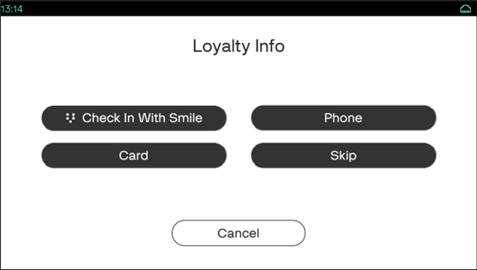
- When this parameter is enabled, the Check-in with Smile button will be visible in the Loyalty screen option.
Response Code
RRefer to Result/Error Codes for more details.
| Response Code | Response Text | Displays |
|---|---|---|
| 59087 | Biometric Check In Failed | 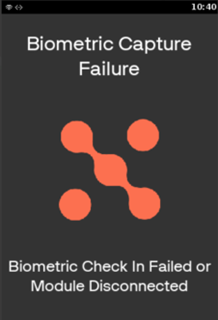
|
| 59088 | Enrolment Needed | NA |
Sample Requests and Responses
Biometric Check In Failed (59087)
Request:
<TRANSACTION>
  <FUNCTION_TYPE>DEVICE</FUNCTION_TYPE>
  <COMMAND>LOYALTY</COMMAND>
</TRANSACTION>
Response:
<RESPONSE>
  <RESPONSE_TEXT>Biometric Check In Failed</RESPONSE_TEXT>
  <RESULT>ERROR</RESULT>
  <RESULT_CODE>59087</RESULT_CODE>
  <TERMINATION_STATUS>FAILURE</TERMINATION_STATUS>
  <COMMAND>LOYALTY</COMMAND>
  <BIOMETRIC_TRAN>0</BIOMETRIC_TRAN>
  <COUNTER>105</COUNTER>
  <POS_RECON>310</POS_RECON>
</RESPONSE>
Enrolment Needed (59088)
Request:
<TRANSACTION>
  <FUNCTION_TYPE>DEVICE</FUNCTION_TYPE>
  <COMMAND>LOYALTY</COMMAND>
</TRANSACTION>
Response:
<RESPONSE>
  <RESPONSE_TEXT>Enrollment Needed</RESPONSE_TEXT>
  <RESULT>ERROR</RESULT>
  <RESULT_CODE>59088</RESULT_CODE>
  <TERMINATION_STATUS>FAILURE</TERMINATION_STATUS>
  <COMMAND>LOYALTY</COMMAND>
  <BIOMETRIC_TRAN>0</BIOMETRIC_TRAN>
  <COUNTER>104</COUNTER>
  <POS_RECON>310</POS_RECON>
</RESPONSE>
