Enhanced Deployment Experience and Status for SCA Terminals
Enhanced Deployment Experience and Status for SCA Terminals
During SCA deployments in stores, users depend on the application to provide timely updates that ensure payment terminals are configured correctly. Currently, the deployment process starts with entering the Device ID into the application, which then executes the required tasks, like -
- Notify users when the terminal is not ready due to missing configurations, such as MID/TID.
- Alert POS systems if the terminal requires essential configurations for payment acceptance.
- Display a progress indicator during downloads or installations from VHQ.
Key Highlights for Enhanced Deployment Experience
Re-Prompt Device ID
- At deployment initiation, the application re-prompts the user to confirm or edit the entered Device ID before submitting it to the VHQ server, errors from manual entry.
- Once the Device ID is captured, the application sends it to VHQ server instantly.
- The application displays a progress indicator during software or parameter downloads or installations from VHQ to inform users of the ongoing activity.
Device Not Ready Status and Notifications
- Currently, after installation, the application defaults to the Idle screen even when required payment configuration (like, MIDs or TIDs) is incomplete. To clearly indicate an incomplete setup, the application now displays an alert message: “Merchant Configuration in Progress, Please Wait.” This alert indicates that while the device has successfully booted up and is able to receive primary POS commands, however payment processing readiness is still pending.
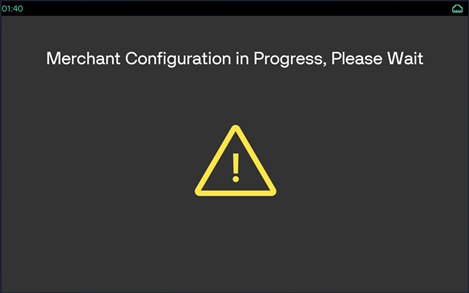
- The application continues to accept and process downloads and installations from VHQ while displaying the readiness status screen, even when required configuration details (such as MIDs or TIDs) are missing or host registration is incomplete.
- The application displays a progress indicator during software or parameter downloads or installations from VHQ to inform users of the ongoing activity.
- Idle screen shortcuts remain available and continue to function as expected, for example, pressing 6 + Enter to access Configuration menu)
- The application also continues to accept and process SET_PARM commands even when it is not ready to accept payments due to missing configuration details.
This enhancement provides the users a better visibility and confirm when terminals are operational. For Semi-Integrated SCA customers using Device ID based boarding, a reliable readiness check is necessary, specifically to ensure:
- Successful provision of all required MIDs and TIDs.
- Completion of host registration.
These checks enable POS systems to start transactions only when the terminal is ready and assist the user in verifying terminal status.
Error Codes and Secondary Port Status Responses
- Error Code: The POS receives an error code 59083 when attempting to Start a Session if the terminal is not ready for transactions.
- Status Responses: New Status response values are introduced for
<SECONDARY_DATA>and<DETAILED_STATUS>, codes 61 and 194 respectively.
A Reboot is required to exit this state after setting the merchant configuration.
This behaviour does not occur when the DEMO setting is enabled, as demo transactions do not require merchant details for processing.
