Store and Forward
Store and Forward (SAF) is a feature for semi-integrated (primarily) and standalone (rarely) configurations of SCA that allows the payment application to conditionally approve payment transactions when the host is unavailable to do so, thereby allowing the merchant to continue to accept payment although at increased risk of not being paid (fraud, declines, etc.). The stored, conditionally approved transactions are later forwarded to the host once it is available again in order to complete the process.
Reasons for SAF
SCA can be configured to perform SAF for various reasons
-
- Network Issues
-
-
- LAN (Local Area Network)
-
- Loose or damaged LAN cable
- WiFi or LAN configuration issue (DNS, etc.)
-
- WAN (Wide Area Network)
-
- ISP (Internet Service Provider) issue
- General internet issue
-
- Gateway
-
- Gateway down
-
- Host
-
- Host down
-
-
- Other reasons for SAF
-
- A command from POS to trigger a SAF mode transaction
- Gateway response (configured) to perform SAF
- Certificate issues (cannot authenticate to gateway/host)
- Host reachable but error responses indicate host internal/backend issues
Supported Transactions - SAF
| Transactions | Details |
|---|---|
| CAPTURE (Credit card) | SAF applies to all Sale (COMPLETION, POST_AUTH, Force) transactions for SCA Direct to Processor (Classic) implementations. For Worldpay Direct implementations, SAF applies to POST_AUTH and SALE transaction only. |
| CLOSE_TAB (Credit card) | SAF applies to Close Tab transactions. |
| ACTIVATE | Gift card transaction to activate the card, based on configuration with ALLOWGIFTTRANTOSAF parameter. |
| AUTH (Credit card) | SAF applies to both AUTH (Pre-authorization) and AUTH with AUTH_CODE (Voice authorization). Once an AUTH transaction is in SAF, a SAF EDIT transaction must be run to change status from PREAUTH to ELIGIBLE. |
| CREDIT (Credit card) | SAF applies to Refund transaction based on configuration. |
| VOID | SAF applies to Void transaction based on configuration. |
Supported Card Types
Following are the card types supported
- Credit
- Gift
- Private Label
SAF Flow
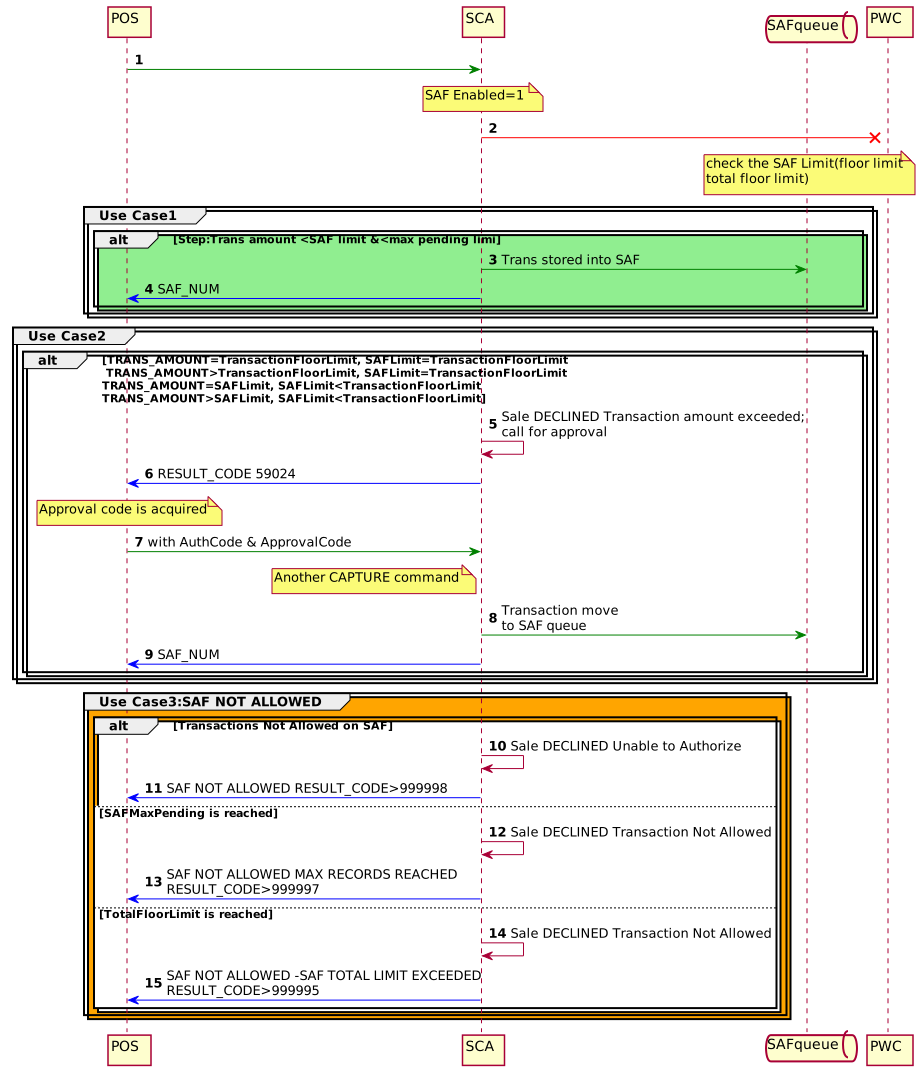
Rules
- When the SAF configuration parameter is enabled and there is loss of connectivity to the server, the payment acceptance device can locally approve transactions below a set floor limit.
- SAF approvals are processed untill certain duration or till MAX limit is reached.
- The stored transactions are written to a queue within the payment device
- Transactions from the SAF queue are sent to the gateway periodically when the application can connect
- When the transaction amount is greater than or equal to the floor limit, then an approval code would be required by the bank to proceed with the transaction. Once approval code is acquired, the POS would send another CAPTURE command including the approval code acquired. This transaction gets added to the SAF queue.
- If an invalid AUTH number is sent in the request when the device is in SAF mode, then the transactions will not be posted to PWC as PWC will reject an invalid AUTH number and return the error code. As the device is in SAF mode, transactions with invalid AUTH number will not respond back to the POS outside of the SAF offline approval.
Configuration Parameters
Following are the configuration parameters which affect the operation
- ALLOWGIFTACTIVATETOSAF
- ALLOWREFUNDTOSAF
- ALLOWVOIDTOSAF
Messages Commands
Refer to the below Protocol sections for the command fields description and examples.
SAF Result Codes
Pre-Defined SAF Result Codes
The following are the pre-defined result codes that could be received by SCA and considered for SAF (where SafEnabled=1): 0, 18, 24, 42, 43, 30002 and 30005
Consider the Use Case where the Point application cannot connect to the gateway.
SAF Error Codes for Fiserv/FDRC Solution
The following are the SAF error codes specific to Fiserv solution, where a Payment transaction if received by SCA (when, SafEnabled=1) with the SAF error code, that transaction will be SAF’ed - 402, 906, 907, 909, 963.
| Error Codes | Error Description |
|---|---|
| 402 | TransArmor Service Unavailable |
| 906 | System Error. There is a problem with the host processing system. Call your helpdesk or operations support. |
| 907 | Card issuer or switch inoperative or processor not available |
| 909 | System malfunction or timeout |
| 963 | Acquirer channel unavailable |
SAF_ERR_CODES.DAT file contains the SAF Error codes that are considered as Host offline/Not-Available and Datawire Error Codes in the second line, which are SAF eligible. Refer to below table for Datawire Error Codes.
Datawire Error Codes
SCA Application is enhanced to handle the Datawire error codes, so that the application follows to the Datawire Specification for TOR and SAF transactions.
SAF_ERR_CODES.DAT file contains the SAF Error codes that are considered as Host offline/Not-Available and Datawire Error Codes in the second line, which are SAF eligible. Refer to below table for Datawire Error Codes.
- If the device receives the error code which is TOR eligible and it is part of SAF_ERR_CODES.DAT file, then application will generate the TOR and irrespective of TOR response, the application will approve the transaction offline.
- If the device receives the error code which is only SAF eligible (200,201,202) then the application should only SAF the transaction and it should not generate the TOR.
- If the device receives the error code 204 then application should generate only one TOR and it should not attempt any more TOR retries.
- If the device receives the error code 204 for reversal then application should not perform any more reversal attempts.
| Datawire Error Code | SAF Eligible? | TOR? | Valid Retry? | Description |
|---|---|---|---|---|
| 6 | No | No | No | Session context provided in the request is not valid or has expired. |
| 200 | Yes | No | Yes | Processor’s Host is busy and is currently unable to service this request. |
| 201 | Yes | No | Yes | Processor’s Host is currently unavailable. |
| 202 | Yes | No | Yes | Could not connect to the processor’s Host. |
| 203 | Yes | Yes | Yes | The processor’s Host disconnected during the transaction before sending a response. |
| 204 | No | Yes | No | An error was encountered while communicating with the processor’s Host. |
| 205 | Yes | Yes | Yes | No response from the processor’s Host |
| 206 | Yes | Yes | Yes | An error was encountered when sending the request to the processor and the Host cannot continue sending packets to the processor because the connection is broken. |
| 405 | Yes | Yes | Yes | The request could not be processed. |
| 505 | Yes | Yes | Yes | The request could not be processed. |
| 8 | Yes | Yes | Yes | The request could not be processed. |
SAF Error Codes for GSC Solution
The following are the error codes specific to GSC solution, that could be received by SCA (when, SafEnabled=1)
| Error Codes | Error Description |
|---|---|
| 500 | HTTP Error codes from GreenBox |
| 502 | HTTP Error codes from GreenBox |
| 503 | HTTP Error codes from GreenBox |
| 9112 | Card issuer unavailable |
| 9200 | Transaction refused before sending to acquirer |
| 8001 | Rejected, unable to perform request at current time, try later |
| 9103 | Re-enter transaction |
SAF Error Codes for UGP Solution
The following are the error codes specific to UGP solution, that could be received by SCA (when SafEnabled=1).
0|14|18|24|43|44|45|55|61|68|30001|30001|30002|30024|58911|59024|58094
| Error Codes | Error Description |
|---|---|
| 0 | UNKNOWN |
| 14 | COM Error with Processor/Card Issuer, Status unknown |
| 18 | COM Error with Processor/Card Issuer, Status unknown |
| 24 | Tokenization Auto-Decline or Host Not Available. Transaction not Attempted |
| 43 | COM Error with Processor/Card Issuer, Status unknown |
| 44 | COM Error with Processor/Card Issuer, Status unknown |
| 45 | COM Error with Processor/Card Issuer, Status unknown |
| 55 | COM Error with Processor/Card Issuer, Status unknown |
| 61 | COM Error with Processor/Card Issuer, Status unknown |
| 68 | COM Error with Processor/Card Issuer, Status unknown |
| 30001 |
|
| 30002 | Internal System Error- PWC Could not Connect to Payment Engine Transaction was not attempted |
| 30024 | PWC Instructed Device to SAF (Enhanced SAF Functionality) |
| 59024 | Com Error |
| 58911 | P2PE Error where P2PE Server did not return a Decrypted Blob |
| 58094 | P2PE Error attempting to request Decryption of P2PE Service. Normally a Connectivity issues with GBX Solution. |
Transaction Below Floor Limit
- Transaction is locally approved and added to the SAF queue. This is assuming that the Total Transaction Limit and Max Pending Limit have not been reached. If it has, then no more SAF transactions will be allowed. Instead, you will receive a message that the offline amount has been exceeded.
- SAF_NUM is returned in the response to the POS.
- Transaction can be removed from the SAF queue by using the SAF REMOVE command.
- If not removed, transaction will be processed once connectivity is restored. There is no guarantee that the transaction will be approved. The processing platform could decline the transaction. Because of this possibility, there is a great need on behalf of the merchant to discuss what both the SAF Floor limit should be and what the Total Transaction Limit should be. The Total Transaction Limit is the total dollar amount that can be in SAF. This is basically dollars at risk of not being approved.
- The POS should query the device’s SAF transactions periodically to determine the status of each transaction. For instance, if a SAF’d transaction reports a status indicating processing was successful and the transaction was approved, then the merchant can expect to be funded for that transaction.
If transactions are still pending in SAF storage, the device should not be upgraded, reconfigured, etc. until those transactions have been dequeued.
Transaction Above Floor Limit
If the transaction exceeds the transaction floor limit (and the total transaction floor limit has not been reached), the transaction is rejected with a message indicating that the offline amount is exceeded. The message also directs the user to call for a voice approval.
Voice Approvals
- Once a Voice Approval is acquired, the transaction would need to be submitted to the Point application as a CAPTURE with AUTH_CODE.
- The application will prompt for card data entry for this transaction.
- Once data is gathered, the application will attempt to connect to the gateway. If connection is unavailable, then this transaction will be added to the SAF queue even though it is above the floor limit.
- SAF_NUM is returned in the response to the POS.
- Transaction can be removed from the SAF queue by using the SAF REMOVE command.
- If not removed, transaction will be processed once connectivity is restored. The risk of rejection for this transaction by the processor is minimal as it has already been approved. An instance where they may decline the transaction would be if it has been several days since the original approval was given.
Other Transactions
- If you submit a transaction other than CAPTURE, AUTH, or CLOSE_TAB, the application will gather all card data and attempt to process the transaction. However, if the connection cannot be established, the transaction will fail. A message indicating that either the transaction type is not allowed in an offline situation or that there was a communication failure will be returned to the POS.
- Devices allow SAF of VOID, ACTIVATE, and CREDIT (Refund) transactions dependent on parameter configuration. See note below.
When the Store and Forward configuration parameter is enabled and there is loss of connectivity to the server, the payment acceptance device can locally approve transactions below a set floor limit until a total limit is reached. The stored transactions are written to a queue within the payment device and the RESPONSE_TEXT element will say Transaction Approved Offline. Once the application can connect, transactions in the SAF queue will be sent to the Point Gateway for processing.
If the transaction amount is greater than or equal to the transaction floor limit (SAFLIMIT), then the application will send the following verbiage in the RESPONSE_TEXT element: Transaction amount exceeded; call for approval (or for Vantiv Direct: Authorizer is Not Currently Available) and the RESULT_CODE will be 59024. Once the approval code is acquired, the POS would send another CAPTURE command including the AUTH_CODE element with the approval code just acquired. This will add the transaction to the SAF queue.
Negative SAF Response Scenarios
| Scenario | POS Response | Device Display |
|---|---|---|
| TRANS_AMOUNT=TransactionFloorLimit, SAFLimit=TransactionFloorLimit |
|
Sale DECLINED Transaction amount exceeded; call for approval |
| TRANS_AMOUNT>TransactionFloorLimit, SAFLimit=TransactionFloorLimit |
|
Sale DECLINED Transaction amount exceeded; call for approval |
| TRANS_AMOUNT=SAFLimit, SAFLimit<TransactionFloorLimit |
|
Sale DECLINED Transaction amount exceeded; call for approval |
| TRANS_AMOUNT>SAFLimit, SAFLimit<TransactionFloorLimit |
|
Sale DECLINED Transaction amount exceeded; call for approval |
| Transactions Not Allowed on SAF |
|
Sale DECLINED Unable to Authorize |
| SAFMaxPending is reached |
|
Sale DECLINED Transaction Not Allowed |
| TotalFloorLimit is reached |
|
Sale DECLINED Transaction Not Allowed |
SAF Throttling
SAF Throttling feature is implemented and used to ensure that all the devices should not attempt to send all SAF transactions immediately upon renewal of connectivity to the host.
Devices will be in SAF mode when there is a connection outage with customer network. Once the connectivity is restored, all the devices will be online and start posting all the SAF transactions at the same time, and this could make the host overloaded.
Therefore, this feature is implemented in Engage devices, to ensure that the terminal will wait for a different duration of time before starting to post the transactions. The waiting time for each terminal will be calculated from the serial number of the terminal. So that all devices wait for a different amount of time, and then the host will not be loaded with huge number of connection request at the same time.
SAF throttling feature can be enabled by setting SAFTHROTTLINGENABLE parameter. This parameter is used to enable or disable SAF throttling feature (throttling mechanism) in SCA. The default value is 0.
SAFTHROTTLINGINTERVAL parameter is also added to calculate the actual throttling interval by finding the modulus of device serial number. The parameter value is used as denominator. The default value is 300.
Refer to Store and Forward Parameters parameter table for more details on SAFTHROTTLINGENABLE and SAFTHROTTLINGINTERVAL configuration parameters.
Actual SAF throttling interval (in seconds) = (Device Serial Number) % SAFTHROTTLINGINTERVAL.
Example -
Serial number of the device is 169-000-278 and SAFTHROTTLINGINTERVAL=300, then throttling interval would be 169000278%300 = 26.
This device will post the SAF record at 26th second, after it detects the host connectivity is renewed and the application will check the file every SAFPOSTINTERVAL after that.
Required Fields for Credit Transactions
Credit Request
| Field | Rule | Type | Minimum | Maximum | Value(s) | Description |
|---|---|---|---|---|---|---|
| PAYMENT_TYPE | Conditional | List |
|
Required when CTROUTD is sent. Optional otherwise. When present, will bypass the consumer payment selection screen. |
Credit Response
| Field | Type | Value(s) | Description |
|---|---|---|---|
| CTROUTD | Numeric | Example: 1629760677599520 | Client-specific Transaction routing ID. NOTE: In case of APM transaction, if this field is present, then order ID will be received from alternate payment method. For example, Alipay, Klarna, WeChat, PayPal, Venmo. CTROUTD field length is increased to 16 characters, so that in APM refund, Transaction ID can be passed from POS. |
| PAYMENT_TYPE | Character | Example: PayPal | Type of payment (example, CREDIT, DEBIT, APM, CHECK). |
Handling SAF Repeating Transactions
In SCA solution, specific host response codes cause transactions to be routed to Store and Forward (SAF). Under certain conditions, these SAF transactions can enter a persistent retry loop, repeatedly attempting processing without successful completion. This behaviour can block subsequent transactions, degrade system performance, and introduce potential compliance risks.
To address this issue, SCA application is enhanced to detect and manage looping SAF transactions by changing them to a DEFERRED status and placing them in a separate processing queue. The application ensures that the same transaction is not continuously retried during a single processing cycle. When repeated host response codes indicate that a transaction would be SAF’d again, the transaction is deferred, and the application proceeds with the next eligible transaction.
Deferred transactions due to repeated SAF response codes are retried once per day for a maximum period of 10 days. If a transaction is not approved within this retry window, it is marked as NOT_PROCESSED, indicating that the transaction will no longer be eligible for automatic retries.
Key Points:
- A transaction is considered to be in a looping state if it receives the same host response code five consecutive times, at which point the looping condition is terminated.
- Transactions identified as looping are transitioned to a DEFERRED status.
- Deferred transactions are retried once per day for up to 10 consecutive days.
- If a transaction is not approved within this retry period, its status is updated to NOT_PROCESSED.
- During SAF dequeue processing, the application skips deferred transactions that are in a looping state.
- The application continues processing the next eligible transaction in the queue, ensuring that retry handling does not impact normal transaction flow.
SAF Forced Mode and Dequeue Functionality
In the SCA solution, certain host response codes can trigger transactions to be stored using SAF (Store and Forward). Specifically, upon receiving a 30024 result code, SCA stores the transaction and enters Forced SAF mode for a configured period, defaulting to 15 minutes. During this period, all eligible transactions are automatically SAF’d.
To support SAF dequeue functionality, the HOSTFORCESAFSUPP parameter has been introduced. When enabled, the application includes the SAF_FORCE_SUPPORT field in SAF eligible payment requests to the host, indicating support for SAF dequeue requests.
Once the terminal is ready to dequeue SAF transactions, typically after the host connection is restored, it establishes communication with PWC to notify the number of pending transactions and initiate the dequeue process using the SAF_DEQUE_REQUEST field in the host request. The dequeue request specifies the total number of SAF transactions and the total transaction amount to be processed.
During this communication, PWC can provide configuration fields that override the terminal’s local defaults. These fields include:
- SAF_DEQUE_PAUSE - Defines the pause between SAF transactions. Default duration can be 10 seconds.
- SAF_QUE_START_SECONDS - Specifies the start delay before initiating SAF dequeue.
- SAF_RETRY_COUNT - Maximum retry attempts for deferred transactions. This value corresponds to the SAFDEFERREDTRANRETRIES parameter, with a default of 5 retries, after which a looping SAF transaction is moved to the deferred state.
- SAF_RETRY_MINUTES - Interval between retries when resending a failed SAF transaction.
- SAF_DEQUE_STATUS - Indicates the current status of SAF dequeue. A value of 0 allows dequeuing if scheduled through SAF_DEQUE_REQUEST or if the count is greater than or equals to 3.
These configuration fields ensure that SAF dequeue processing on the terminal follows host-defined rules while respecting local configuration defaults.
