Best Practices for Integration
Session and Port Management
Session Management
The POS should be doing Start Session session at beginning of POS transaction and a FINISH session at end of the transaction. Best practice is to START a session, process however many tenders are needed in order to satisfy the transaction amount, and then to FINISH the session.
A session must be open for all payment (FUNCTION_TYPE - PAYMENT) and line item (FUNCTION_TYPE - LINE_ITEM) transactions. Point persists an open state between POS requests using this session. If a session is not open, the device will return with “No session” in the RESPONSE_TEXT element.
The POS system can use a Finish Session command to emulate a POS close out/exit of the session as long as the payment transaction is not ‘in-flight’ to the gateway or host. To cancel the session, the POS system should send the Finish Session command.
Socket Management
Socket Creation and Tear Down should mirror the POS Start Session session and Finish Session session. Always attempt to finish the session before closing the socket connection.
If you have consistent session independent commands that you can tie to a POS transaction, you should use your discretion. It is safest to create and tear down on each of the independent commands if they are not piggy backed to a start/finish session from a transactional flow perspective.
From a device perspective, there is no harm leaving the socket open even beyond session finish, ust be cautious and ensure the POS knows to reconnect if for some reason the socket connection is unavailable. For instance, if some network actor causes the socket to close (maybe due to TTL, inactivity, etc.) but the higher-level interface (Java, C#, etc.) does not receive notification of this event, the POS may still “think” the socket is open.
Secondary Port
When a session is started, the primary port is restricted to transaction processing commands. Secondary port commands may be used to check the status of the primary port, cancel the transaction currently in progress, or reboot the device and resync its connection to the POS. Other uses are explained below.
SCA offers a secondary port on port 5016. The secondary port is used as a back channel to the device, as the primary port (5015) may be in use due to its request/response synchronous nature. The secondary port is enabled and identified using configuration parameters.
It should be noted that the secondary port will never contain transactional data or details and is not required to be message authenticated (i.e., no MAC).
Uses for Secondary Port
-
Checking status to determine what point of the transaction or consumer interaction is occurring on the primary port
- Example: POS may have issued a capture command and not received a response in 20 seconds. The POS may want to periodically check the status to see if the consumer is progressing through the payment process effectively.
- It should be noted this does not mean that the POS should issue a command on the primary port and immediately and repeatedly query for a status on the secondary port. Human interactions with the SCA payment application do take some time to perform, so interval polling or checking is appropriate based upon the type of request issued on the primary port.
-
Obtaining data about the SCA application or terminal, such as device name or device serial number
-
- Determining if the device is in session with another POS and for how long.
-
- It may also be used to determine if the POS may have another session in progress itself that was not finished or terminated properly. The secondary port may be used to determine the status so that the connection can be cleaned up and/or re-established.
-
Rebooting the device if the POS has lost its connection with the primary port or believes that the device is in a non-recoverable state.
Refer to Secondary Port Transactions section for more details on Secondary Port transaction.
Network Settings
If a network infrastructure component (e.g., switch, router, etc.) is breaking the packets on a signature block and packet fragments arrive at the POS, consider increasing the network maximum transmission unit (MTU) size to avoid packet splitting.
Pairing Best Practices
The POS is supposed to store credentials to send with the transactions. Re-pairing should not take place for each transaction – that is cumbersome, and the COUNTER value would always be 1. On a Register response, here is what is supposed to be done with the MAC_KEY:
Option 1 (faster):
- Base64 decode the MAC_KEY
- Decrypt the decoded value using the private key
- Store the decrypted value and use that value to create the HMAC of the COUNTER on subsequent requests
Option 2 (more secure):
- Base64 decode the MAC_KEY
- Store the decoded value
- Decrypt the decoded value using the private key before each request and use the decrypted value to create the HMAC of the COUNTER
Register_Encryption is the best overall security option for pairing Multiple ways for the POS to determine the IP.
- On screen via Network Settings splash screen after reboot
- Barcode the terminal and scan it into the POS at time of pairing
- Search each IP on the subnet for the device name
Once Paired, the POS should maintain the IP, Serial Number, and MAC address of the device to which it is paired. Each subsequent boot up the POS should query the ARP table for the MAC address of the IP to which it believes it is paired. The POS will immediately know if the IP of the device changed (for DHCP).
Payment Transactions Best Practices
Capture (Sale)
- Send Start Session Session command to start a new session. The command is mandatory to send before starting a payment transaction. Request format and expected response are provided below.
Request
<TRANSACTION>
<FUNCTION_TYPE>SESSION</FUNCTION_TYPE>
<COMMAND>START</COMMAND>
<BUSINESSDATE>20210712</BUSINESSDATE>
<TRAINING_MODE>0</TRAINING_MODE>
<INVOICE>123456</INVOICE>
<NOTIFY_SCA_EVENTS>FALSE</NOTIFY_SCA_EVENTS>
</TRANSACTION>
Response
<RESPONSE>
<RESPONSE_TEXT>Session Started</RESPONSE_TEXT>
<RESULT>OK</RESULT>
<RESULT_CODE>-1</RESULT_CODE>
<TERMINATION_STATUS>SUCCESS</TERMINATION_STATUS>
<TRAINING_MODE>OFF</TRAINING_MODE>
<COUNTER>12</COUNTER>
</RESPONSE>
- Send the below Capture request for the Sale transaction. Response format provided below. These steps provided based on Contact and CTLS Sale transaction. For Manual transaction MANUAL_ENTRY field should be set to TRUE (<MANUAL_ENTRY>FALSE</MANUAL_ENTRY>).
Request
<TRANSACTION>
<FUNCTION_TYPE>PAYMENT</FUNCTION_TYPE>
<COMMAND>CAPTURE</COMMAND>
<TRANS_AMOUNT>9.00</TRANS_AMOUNT>
<MANUAL_ENTRY>FALSE</MANUAL_ENTRY>
<FORCE_FLAG>FALSE</FORCE_FLAG>
<CARD_EXP_MONTH>10</CARD_EXP_MONTH>
<CARD_EXP_YEAR>22</CARD_EXP_YEAR>
<CARD_TOKEN>fRiDcosOVskwZ8xdARQn</CARD_TOKEN>
<PAYMENT_TYPE>CREDIT</PAYMENT_TYPE>
</TRANSACTION>
Response
<RESPONSE>
<APPROVED_AMOUNT>9.00</APPROVED_AMOUNT>
<AUTH_CODE>093079</AUTH_CODE>
<BANK_USERDATA>VISA</BANK_USERDATA>
<CARD_EXP_MONTH>10</CARD_EXP_MONTH>
<CARD_EXP_YEAR>22</CARD_EXP_YEAR>
<CARD_TOKEN>fRiDcosOVskwZ8xdARQn</CARD_TOKEN>
<CTROUTD>42308</CTROUTD>
<INVOICE>123456</INVOICE>
<INTRN_SEQ_NUM>4007842722</INTRN_SEQ_NUM>
<LPTOKEN>3278483765646148999</LPTOKEN>
<MERCHID>222220001008</MERCHID>
<PAYMENT_MEDIA>VISA</PAYMENT_MEDIA>
<PAYMENT_TYPE>CREDIT</PAYMENT_TYPE>
<RESPONSE_CODE>A</RESPONSE_CODE>
<RESPONSE_TEXT>CAPTURED</RESPONSE_TEXT>
<RESULT>CAPTURED</RESULT>
<RESULT_CODE>4</RESULT_CODE>
<TERMID>001</TERMID>
<TERMINATION_STATUS>SUCCESS</TERMINATION_STATUS>
<TKN_EXPDATE>07022021</TKN_EXPDATE>
<TKN_MATCHING>3278483765646148999</TKN_MATCHING>
<TKN_USED>1</TKN_USED>
<TOKEN_SOURCE>PWC</TOKEN_SOURCE>
<TRAINING_MODE>OFF</TRAINING_MODE>
<TRANS_AMOUNT>9.00</TRANS_AMOUNT>
<TRANS_DATE>2021.06.02</TRANS_DATE>
<TRANS_SEQ_NUM>62</TRANS_SEQ_NUM>
<TRANS_TIME>07:45:39</TRANS_TIME>
<TROUTD>4007842722</TROUTD>
<RECEIPT_DATA>
        <RECEIPT>
                <TEXTLINE> OT WE Retail </TEXTLINE>
                <TEXTLINE />
                <TEXTLINE> 100 North Point St </TEXTLINE>
                <TEXTLINE> SAN FRANCISCO, CA 94133 </TEXTLINE>
                <TEXTLINE />
                <TEXTLINE />
                <TEXTLINE> 06/02/21 07:45:39</TEXTLINE>
                <TEXTLINE />
                <TEXTLINE />
                <TEXTLINE />
                <TEXTLINE> SALE </TEXTLINE>
                <TEXTLINE />
                <TEXTLINE> Entry Method: MANUAL </TEXTLINE>
                <TEXTLINE />
                <TEXTLINE>Appr Code: 093079 Batch: 53001</TEXTLINE>
                <TEXTLINE>Transaction ID: 42308 </TEXTLINE>
                <TEXTLINE>Invoice: 123456 </TEXTLINE>
                <TEXTLINE>Response: CAPTURED </TEXTLINE>
                <TEXTLINE>Approved: Online </TEXTLINE>
                <TEXTLINE />
                <TEXTLINE> Total: USD $ 9.00</TEXTLINE>
                <TEXTLINE />
                <TEXTLINE />
                <TEXTLINE>X_____________________________</TEXTLINE>
                <TEXTLINE />
                <TEXTLINE />
                <TEXTLINE> No Refunds </TEXTLINE>
                <TEXTLINE> Store Credit Only </TEXTLINE>
                <TEXTLINE />
                <TEXTLINE> Merchant Copy </TEXTLINE>
                <TEXTLINE />
                <TEXTLINE />
                <TEXTLINE />
                <TEXTLINE />
        </RECEIPT>
        <RECEIPT>
                <TEXTLINE> OT WE Retail </TEXTLINE>
                <TEXTLINE />
                <TEXTLINE> 100 North Point St </TEXTLINE>
                <TEXTLINE> SAN FRANCISCO, CA 94133 </TEXTLINE>
                <TEXTLINE />
                <TEXTLINE />
                <TEXTLINE>06/02/21 07:45:39 </TEXTLINE>
                <TEXTLINE />
                <TEXTLINE />
                <TEXTLINE />
                <TEXTLINE> SALE </TEXTLINE>
                <TEXTLINE />
                <TEXTLINE> Entry Method: MANUAL </TEXTLINE>
                <TEXTLINE />
                <TEXTLINE>Appr Code: 093079 Batch: 153001</TEXTLINE>
                <TEXTLINE> Transaction ID: 42308 </TEXTLINE>
                <TEXTLINE> Invoice: 123456 </TEXTLINE>
                <TEXTLINE> Response: CAPTURED </TEXTLINE>
                <TEXTLINE> Approved: Online </TEXTLINE>
                <TEXTLINE />
                <TEXTLINE>Total: USD $ 9.00</TEXTLINE>
                <TEXTLINE />
                <TEXTLINE />
                <TEXTLINE> No Refunds </TEXTLINE>
                <TEXTLINE> Store Credit Only </TEXTLINE>
                <TEXTLINE />
                <TEXTLINE />
                <TEXTLINE> Customer Copy </TEXTLINE>
                <TEXTLINE />
                <TEXTLINE />
                <TEXTLINE />
                <TEXTLINE />
        </RECEIPT>
</RECEIPT_DATA>
<COUNTER>9</COUNTER>
</RESPONSE>
- Once the transaction completed, send Finish Session command to finish the payment process (payment and line item transactions) and closes the session. Request format and expected response are provided below.
Request
<TRANSACTION>
<FUNCTION_TYPE>SESSION</FUNCTION_TYPE>
<COMMAND>FINISH</COMMAND>
<COUNTER>1</COUNTER>
<MAC> … </MAC>
<MAC_LABEL>REG2</MAC_LABEL>
</TRANSACTION>
Response
<RESPONSE>
<RESPONSE_TEXT>SESSION finished</RESPONSE_TEXT>
<RESULT>OK</RESULT>
<RESULT_CODE>-1</RESULT_CODE>
<TERMINATION_STATUS>SUCCESS</TERMINATION_STATUS>
<COUNTER>1</COUNTER>
</RESPONSE>
Partial Approval
- Send Start Session Session command to start a new session.
- Send the below command request to perform a Sale transaction for partial approval. Response format is provided below.
Request
<TRANSACTION>
<FUNCTION_TYPE>PAYMENT</FUNCTION_TYPE>
<COMMAND>CAPTURE</COMMAND>
<COUNTER>1</COUNTER>
<MAC>………..</MAC>
<MAC_LABEL>REG_2</MAC_LABEL>
<TRANS_AMOUNT>4.00</TRANS_AMOUNT>
</TRANSACTION>
Response
<RESPONSE_TEXT>CAPTURED : 000 : AP</RESPONSE_TEXT>
<RESULT>CAPTURED</RESULT>
<RESULT_CODE>4</RESULT_CODE>
<TERMINATION_STATUS>SUCCESS</TERMINATION_STATUS>
<TRANS_SEQ_NUM>60</TRANS_SEQ_NUM>
<INTRN_SEQ_NUM>5726881</INTRN_SEQ_NUM>
<TROUTD>3839</TROUTD>
<CTROUTD>303</CTROUTD>
<PAYMENT_TYPE>CREDIT</PAYMENT_TYPE>
<PAYMENT_MEDIA>VISA</PAYMENT_MEDIA>
<ACCT_NUM>************8291</ACCT_NUM>
<AUTH_CODE>098822</AUTH_CODE>
<APPROVED_AMOUNT>2.00</APPROVED_AMOUNT>
<DIFF_AMOUNT_DUE>2.00</DIFF_AMOUNT_DUE>
<CARDHOLDER>VISA TEST</CARDHOLDER>
<VSP_CODE>100</VSP_CODE>
<VSP_RESULTDESC>Success</VSP_RESULTDESC>
<VSP_TRXID>635912345549651203</VSP_TRXID>
<ORIG_TRANS_AMOUNT>2.00</ORIG_TRANS_AMOUNT>
<RECEIPT_DATA>
- Partial approval screen will be displayed on the terminal with the options Yes and No.
- Once the transaction completed, send Finish Session command to finish the payment process/session.
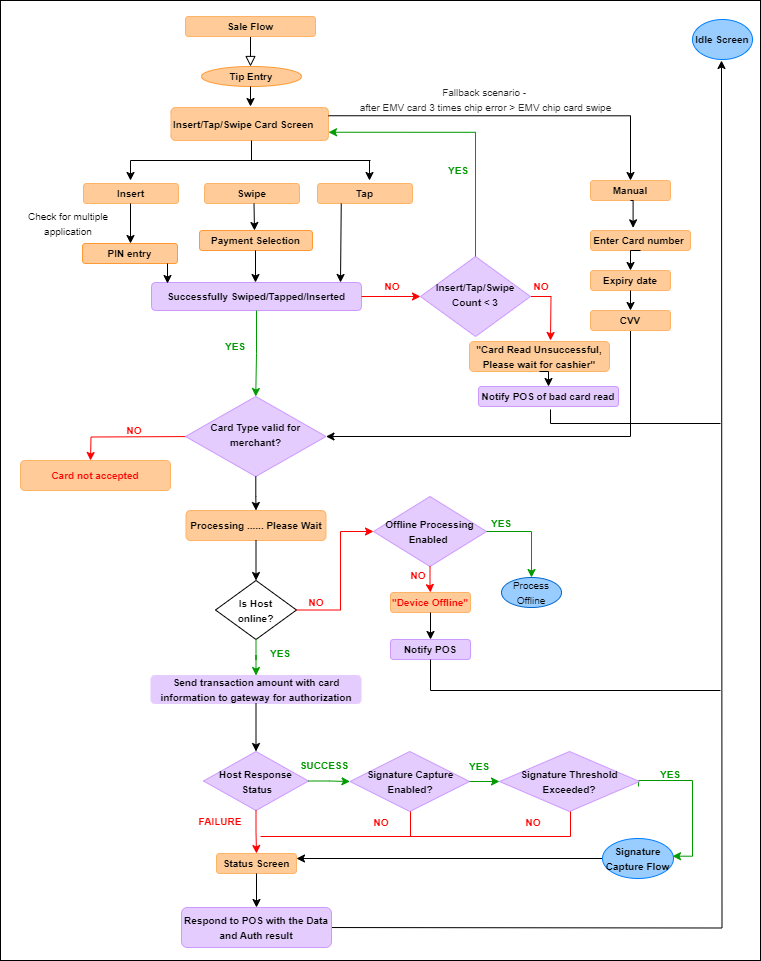
 represent prompts/screens shown on the device and purple boxes
  represent work being done by business logic of the application. This is an example for Retail.
Credit (Refunds)
CREDIT (Message Interface) transaction returns funds to a cardholder’s account. It is typically used after a batch has been settled or closed. Send Start Session session command to start a session. The command is mandatory to send before starting a payment transaction. Request format and expected response are provided below.
Request
<TRANSACTION>
<FUNCTION_TYPE>SESSION</FUNCTION_TYPE>
<COMMAND>START</COMMAND>
<BUSINESSDATE>20210712</BUSINESSDATE>
<TRAINING_MODE>0</TRAINING_MODE>
<INVOICE>123456</INVOICE>
<NOTIFY_SCA_EVENTS>FALSE</NOTIFY_SCA_EVENTS>
</TRANSACTION>
Response
<RESPONSE>
<RESPONSE_TEXT>Session Started</RESPONSE_TEXT>
<RESULT>OK</RESULT>
<RESULT_CODE>-1</RESULT_CODE>
<TERMINATION_STATUS>SUCCESS</TERMINATION_STATUS>
<TRAINING_MODE>OFF</TRAINING_MODE>
<COUNTER>12</COUNTER>
</RESPONSE>
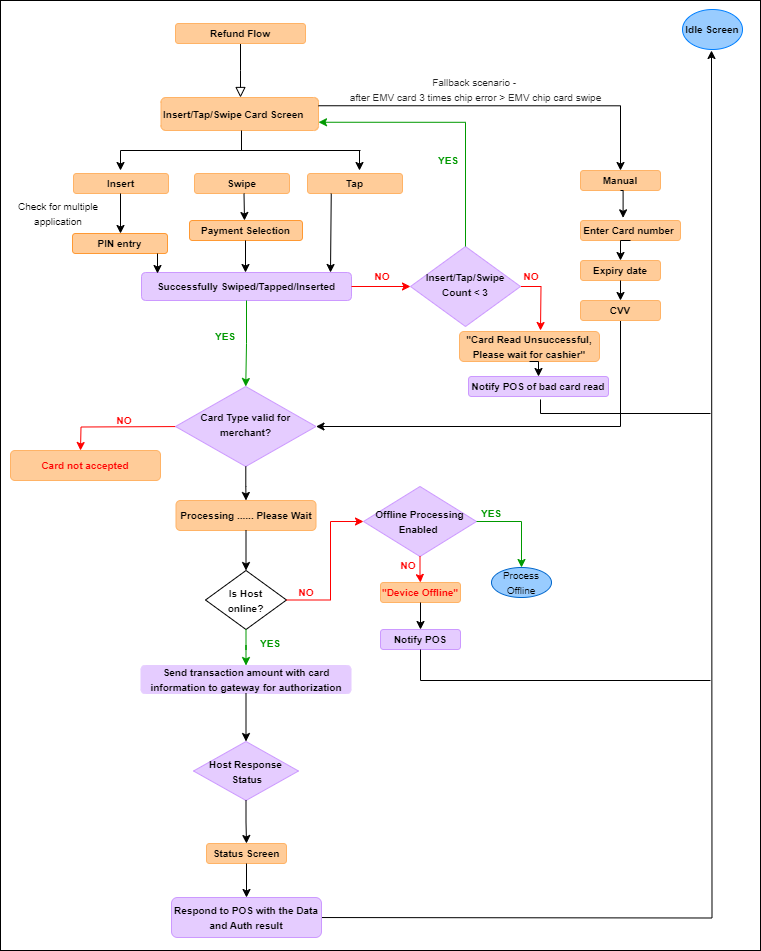
Refund Flow with Card Screen
- Send the below CREDIT (Message Interface) request for the Refund transaction. Response format provided below. These steps provided based on Contact and CTLS Refund transaction.
Request
<TRANSACTION>
<FUNCTION_TYPE>PAYMENT</FUNCTION_TYPE>
<COMMAND>CREDIT</COMMAND>
<CTROUTD> </CTROUTD>
<TRANS_AMOUNT>4.00</TRANS_AMOUNT>
<PAYMENT_TYPE>CREDIT</PAYMENT_TYPE>
<MANUAL_ENTRY>FALSE</MANUAL_ENTRY>
</TRANSACTION>
Response
<RESPONSE>
<ACCT_NUM>222360******0203</ACCT_NUM>
<APPROVED_AMOUNT>4.00</APPROVED_AMOUNT>
<BANK_USERDATA>MC</BANK_USERDATA>
<BATCH_TRACE_ID>b4524d4b-93cc-4b61-ae43-563dbc3d8362</BATCH_TRACE_ID>
<CARD_ABBRV>MC</CARD_ABBRV>
<CARD_ENTRY_MODE>Contactless</CARD_ENTRY_MODE>
<CARD_EXP_MONTH>12</CARD_EXP_MONTH>
<CARD_EXP_YEAR>25</CARD_EXP_YEAR>
<CARD_TOKEN>2223602299990203</CARD_TOKEN>
<CTROUTD>75865</CTROUTD>
<INVOICE>123456</INVOICE>
<EMV_CVM>NONE</EMV_CVM>
<EMV_MODE>ISSUER</EMV_MODE>
<EMV_TAG_4F>A0000000041010</EMV_TAG_4F>
<EMV_TAG_50>MASTERCARD</EMV_TAG_50>
<EMV_TAG_5F2A>0840</EMV_TAG_5F2A>
<EMV_TAG_5F34>01</EMV_TAG_5F34>
<EMV_TAG_82>1980</EMV_TAG_82>
<EMV_TAG_84>A0000000041010</EMV_TAG_84>
<EMV_TAG_8A>Z1</EMV_TAG_8A>
<EMV_TAG_95>8000008001</EMV_TAG_95>
<EMV_TAG_9A>220717</EMV_TAG_9A>
<EMV_TAG_9B>6800</EMV_TAG_9B>
<EMV_TAG_9C>20</EMV_TAG_9C>
<EMV_TAG_9F02>000000000400</EMV_TAG_9F02>
<EMV_TAG_9F03>000000000000</EMV_TAG_9F03>
<EMV_TAG_9F06>A0000000041010</EMV_TAG_9F06>
<EMV_TAG_9F07>FF00</EMV_TAG_9F07>
<EMV_TAG_9F08>0002</EMV_TAG_9F08>
<EMV_TAG_9F09>0002</EMV_TAG_9F09>
<EMV_TAG_9F0D>0000000000</EMV_TAG_9F0D>
<EMV_TAG_9F0E>0000000000</EMV_TAG_9F0E>
<EMV_TAG_9F0F>F470808000</EMV_TAG_9F0F>
<EMV_TAG_9F10>0110800009220000000000000000000000FF</EMV_TAG_9F10>
<EMV_TAG_9F12>Mastercard</EMV_TAG_9F12>
<EMV_TAG_9F1A>0840</EMV_TAG_9F1A>
<EMV_TAG_9F1E>47312282</EMV_TAG_9F1E>
<EMV_TAG_9F21>160836</EMV_TAG_9F21>
<EMV_TAG_9F26>216B224CA3AA1958</EMV_TAG_9F26>
<EMV_TAG_9F27>00</EMV_TAG_9F27>
<EMV_TAG_9F33>E00800</EMV_TAG_9F33>
<EMV_TAG_9F34>1F0302</EMV_TAG_9F34>
<EMV_TAG_9F35>22</EMV_TAG_9F35>
<EMV_TAG_9F36>002F</EMV_TAG_9F36>
<EMV_TAG_9F37>B7DD4240</EMV_TAG_9F37>
<EMV_TAG_9F39>07</EMV_TAG_9F39>
<EMV_TAG_9F40>F000F0A001</EMV_TAG_9F40>
<EMV_TAG_9F41>00000003</EMV_TAG_9F41>
<EMV_TAG_9F4E>VerifoneFD</EMV_TAG_9F4E>
<EMV_TAG_9F53>R</EMV_TAG_9F53>
<EMV_TAG_9F6E>0840000030300000000000000000000000000000000000000000000000000000</EMV_TAG_9F6E>
<INTRN_SEQ_NUM>4016133621</INTRN_SEQ_NUM>
<MERCHID>005059233998</MERCHID>
<PAYMENT_MEDIA>MC</PAYMENT_MEDIA>
<PAYMENT_TYPE>CREDIT</PAYMENT_TYPE>
<REFERENCE>000000000004</REFERENCE>
<RESPONSE_TEXT>APPROVAL - 000 </RESPONSE_TEXT>
<RESULT>CAPTURED</RESULT>
<RESULT_CODE>4</RESULT_CODE>
<TERMID>1126076</TERMID>
<TERMINATION_STATUS>SUCCESS</TERMINATION_STATUS>
<TRACE_CODE>133621</TRACE_CODE>
<TRAINING_MODE>OFF</TRAINING_MODE>
<TRANS_AMOUNT>4.00</TRANS_AMOUNT>
<TRANS_SEQ_NUM>4</TRANS_SEQ_NUM>
<TRANS_DATE>2022.07.17</TRANS_DATE>
<TRANS_TIME>06:38:58</TRANS_TIME>
<TROUTD>4016133621</TROUTD>
<VSP_CODE>100</VSP_CODE>
<VSP_RESULTDESC>Success</VSP_RESULTDESC>
<VSP_TRXID>637936511372920945</VSP_TRXID>
<COUNTER>8</COUNTER>
<TRAN_LANG_CODE>en</TRAN_LANG_CODE>
<RECEIPT_DATA>
        <RECEIPT>
                <TEXTLINE>      BED BATH BEYOND 1997          </TEXTLINE>
                <TEXTLINE>              1997                  </TEXTLINE>
                <TEXTLINE>        650 Liberty Ave             </TEXTLINE>
                <TEXTLINE>        UNION, NJ 07083             </TEXTLINE>
                <TEXTLINE />
                <TEXTLINE />
                <TEXTLINE>07/17/22                    16:09:00</TEXTLINE>
                <TEXTLINE />
                <TEXTLINE>Client ID: 17345800010001           </TEXTLINE>
                <TEXTLINE>Merchant ID: ********3998           </TEXTLINE>
                <TEXTLINE>Term ID: 1126076                    </TEXTLINE>
                <TEXTLINE />
                <TEXTLINE />
                <TEXTLINE>                 Refund             </TEXTLINE>
                <TEXTLINE />
                <TEXTLINE>************0203          MASTERCARD</TEXTLINE>
                <TEXTLINE>Entry Method: Chip Read Contactless </TEXTLINE>
                <TEXTLINE />
                <TEXTLINE>Transaction ID: 75865               </TEXTLINE>
                <TEXTLINE>Payment Type: CREDIT                </TEXTLINE>
                <TEXTLINE>Mode:Issuer                         </TEXTLINE>
                <TEXTLINE>Result:CAPTURED                     </TEXTLINE>
                <TEXTLINE>Approved Amount:USD $4.00           </TEXTLINE>
                <TEXTLINE>Application Pan:************0203    </TEXTLINE>
                <TEXTLINE>Invoice: 123456                     </TEXTLINE>
                <TEXTLINE>Ref: 000000000004                   </TEXTLINE>
                <TEXTLINE>Response: APPROVAL - 000            </TEXTLINE>
                <TEXTLINE>Approved: Online                    </TEXTLINE>
                <TEXTLINE>CID Code:0x00 (AAC)                 </TEXTLINE>
                <TEXTLINE />
                <TEXTLINE>Mastercard                          </TEXTLINE>
                <TEXTLINE>SEQUENCE: 00000003                  </TEXTLINE>
                <TEXTLINE>AID: A0000000041010                 </TEXTLINE>
                <TEXTLINE>TVR: 8000008001                     </TEXTLINE>
                <TEXTLINE>TSI: 6800                           </TEXTLINE>
                <TEXTLINE>IAD: 0110800009220000000000000000000000F</TEXTLINE>
                <TEXTLINE>F                                     </TEXTLINE>
                <TEXTLINE>ARC: Z1                               </TEXTLINE>
                <TEXTLINE />
                <TEXTLINE />
                <TEXTLINE>Total:           USD     $        4.00</TEXTLINE>
                <TEXTLINE />
                <TEXTLINE />
                <TEXTLINE />
                <TEXTLINE />
                <TEXTLINE>         NO SIGNATURE REQUIRED        </TEXTLINE>
                <TEXTLINE />
                <TEXTLINE />
                <TEXTLINE>               No Refunds             </TEXTLINE>
                <TEXTLINE>           Store Credit Only          </TEXTLINE>
                <TEXTLINE />
                <TEXTLINE>             Merchant Copy            </TEXTLINE>
                <TEXTLINE />
                <TEXTLINE />
                <TEXTLINE />
                <TEXTLINE />
                </RECEIPT>
                <RECEIPT>
                <TEXTLINE>          BED BATH BEYOND 1997        </TEXTLINE>
                <TEXTLINE>                  1997                </TEXTLINE>
                <TEXTLINE>            650 Liberty Ave           </TEXTLINE>
                <TEXTLINE>            UNION, NJ 07083           </TEXTLINE>
                <TEXTLINE />
                <TEXTLINE />
                <TEXTLINE>07/17/22                      16:09:01</TEXTLINE>
                <TEXTLINE />
                <TEXTLINE>Client ID: 17345800010001             </TEXTLINE>
                <TEXTLINE>Merchant ID: ********3998             </TEXTLINE>
                <TEXTLINE>Term ID: 1126076                      </TEXTLINE>
                <TEXTLINE />
                <TEXTLINE />
                <TEXTLINE>                 Refund               </TEXTLINE>
                <TEXTLINE />
                <TEXTLINE>************0203            MASTERCARD</TEXTLINE>
                <TEXTLINE>Entry Method: Chip Read Contactless   </TEXTLINE>
                <TEXTLINE />
                <TEXTLINE>Transaction ID: 75865                 </TEXTLINE>
                <TEXTLINE>Payment Type: CREDIT                  </TEXTLINE>
                <TEXTLINE>Mode:Issuer                           </TEXTLINE>
                <TEXTLINE>Result:CAPTURED                       </TEXTLINE>
                <TEXTLINE>Approved Amount:USD $4.00             </TEXTLINE>
                <TEXTLINE>Application Pan:************0203      </TEXTLINE>
                <TEXTLINE>Invoice: 123456                       </TEXTLINE>
                <TEXTLINE>Ref: 000000000004                     </TEXTLINE>
                <TEXTLINE>Approved: Online                      </TEXTLINE>
                <TEXTLINE>CID Code:0x00 (AAC)                   </TEXTLINE>
                <TEXTLINE />
                <TEXTLINE>Mastercard                            </TEXTLINE>
                <TEXTLINE>SEQUENCE: 00000003                    </TEXTLINE>
                <TEXTLINE>AID: A0000000041010                   </TEXTLINE>
                <TEXTLINE>TVR: 8000008001                       </TEXTLINE>
                <TEXTLINE>TSI: 6800                             </TEXTLINE>
                <TEXTLINE>IAD: 0110800009220000000000000000000000F</TEXTLINE>
                <TEXTLINE>F                                     </TEXTLINE>
                <TEXTLINE>ARC: Z1                               </TEXTLINE>
                <TEXTLINE />
                <TEXTLINE />
                <TEXTLINE>Total:           USD     $        4.00</TEXTLINE>
                <TEXTLINE />
                <TEXTLINE />
                <TEXTLINE />
                <TEXTLINE />
                <TEXTLINE>               No Refunds             </TEXTLINE>
                <TEXTLINE>           Store Credit Only          </TEXTLINE>
                <TEXTLINE />
                <TEXTLINE />
                <TEXTLINE>             Customer Copy            </TEXTLINE>
                <TEXTLINE />
                <TEXTLINE />
                <TEXTLINE />
                <TEXTLINE />
        </RECEIPT>
</RECEIPT_DATA>
</RESPONSE>
- Once the transaction completed, send Finish Session command to finish the payment process (payment and line item transactions) and closes the session. Request format and expected response are provided below.
Request
<TRANSACTION>
<FUNCTION_TYPE>SESSION</FUNCTION_TYPE>
<COMMAND>FINISH</COMMAND>
<COUNTER>1</COUNTER>
<MAC> … </MAC>
<MAC_LABEL>REG2</MAC_LABEL>
</TRANSACTION>
Response
<RESPONSE>
<RESPONSE_TEXT>SESSION finished</RESPONSE_TEXT>
<RESULT>OK</RESULT>
<RESULT_CODE>-1</RESULT_CODE>
<TERMINATION_STATUS>SUCCESS</TERMINATION_STATUS>
<COUNTER>1</COUNTER>
</RESPONSE>
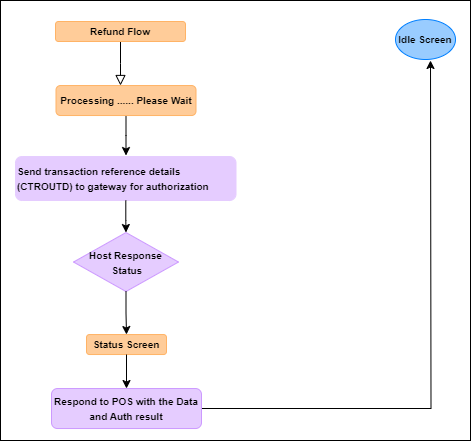
Refund Flow without Card Screen
Send the below CREDIT (Message Interface) request for the Refund transaction with CTROUTD field details. Response format provided below.
Request
<TRANSACTION>
<FUNCTION_TYPE>PAYMENT</FUNCTION_TYPE>
<COMMAND>CREDIT</COMMAND>
<CTROUTD>75867</CTROUTD>
<TRANS_AMOUNT>3.00</TRANS_AMOUNT>
<PAYMENT_TYPE>CREDIT</PAYMENT_TYPE>
<MANUAL_ENTRY>FALSE</MANUAL_ENTRY>
</TRANSACTION>
Response
<RESPONSE>
<ACCT_NUM>222360******0203</ACCT_NUM>
<APPROVED_AMOUNT>3.00</APPROVED_AMOUNT>
<BANK_USERDATA>MC</BANK_USERDATA>
<BATCH_TRACE_ID>2238160f-35e0-4d25-a1e2-47133fc5cb15</BATCH_TRACE_ID>
<CTROUTD>75869</CTROUTD>
<INVOICE>123456</INVOICE>
<INTRN_SEQ_NUM>4016133662</INTRN_SEQ_NUM>
<MERCHID>005059233998</MERCHID>
<PAYMENT_MEDIA>MC</PAYMENT_MEDIA>
<PAYMENT_TYPE>CREDIT</PAYMENT_TYPE>
<REFERENCE>000000000005</REFERENCE>
<RESPONSE_TEXT>APPROVAL - 000 </RESPONSE_TEXT>
<RESULT>CAPTURED</RESULT>
<RESULT_CODE>4</RESULT_CODE>
<TERMID>1126076</TERMID>
<TERMINATION_STATUS>SUCCESS</TERMINATION_STATUS>
<TRACE_CODE>133662</TRACE_CODE>
<TRAINING_MODE>OFF</TRAINING_MODE>
<TRANS_AMOUNT>3.00</TRANS_AMOUNT>
<TRANS_SEQ_NUM>7</TRANS_SEQ_NUM>
<TRANS_DATE>2022.07.17</TRANS_DATE>
<TRANS_TIME>06:57:25</TRANS_TIME>
<TROUTD>4016133662</TROUTD>
<VSP_CODE>910</VSP_CODE>
<VSP_RESULTDESC>VSP NOT APPLICABLE</VSP_RESULTDESC>
<VSP_TRXID>0</VSP_TRXID>
<COUNTER>13</COUNTER>
<RECEIPT_DATA>
        <RECEIPT>
                <TEXTLINE>          BED BATH BEYOND 1997          </TEXTLINE>
                <TEXTLINE>                  1997                  </TEXTLINE>
                <TEXTLINE>            650 Liberty Ave             </TEXTLINE>
                <TEXTLINE>            UNION, NJ 07083             </TEXTLINE>
                <TEXTLINE />
                <TEXTLINE />
                <TEXTLINE>07/17/22                        16:27:29</TEXTLINE>
                <TEXTLINE />
                <TEXTLINE>Client ID: 17345800010001               </TEXTLINE>
                <TEXTLINE>Merchant ID: ********3998               </TEXTLINE>
                <TEXTLINE>Term ID: 1126076                        </TEXTLINE>
                <TEXTLINE />
                <TEXTLINE />
                <TEXTLINE>                 Refund                 </TEXTLINE>
                <TEXTLINE />
                <TEXTLINE>                              MASTERCARD</TEXTLINE>
                <TEXTLINE>Entry Method: Host Retrieval            </TEXTLINE>
                <TEXTLINE />
                <TEXTLINE>Transaction ID: 75869                   </TEXTLINE>
                <TEXTLINE>Payment Type: CREDIT                    </TEXTLINE>
                <TEXTLINE>Result:CAPTURED                         </TEXTLINE>
                <TEXTLINE>Approved Amount:USD $3.00               </TEXTLINE>
                <TEXTLINE>Invoice: 123456                         </TEXTLINE>
                <TEXTLINE>Ref: 000000000005                       </TEXTLINE>
                <TEXTLINE>Response: APPROVAL - 000                </TEXTLINE>
                <TEXTLINE>Approved: Online                        </TEXTLINE>
                <TEXTLINE />
                <TEXTLINE />
                <TEXTLINE>Total:           USD     $          3.00</TEXTLINE>
                <TEXTLINE />
                <TEXTLINE />
                <TEXTLINE />
                <TEXTLINE />
                <TEXTLINE>         NO SIGNATURE REQUIRED          </TEXTLINE>
                <TEXTLINE />
                <TEXTLINE />
                <TEXTLINE>               No Refunds               </TEXTLINE>
                <TEXTLINE>           Store Credit Only            </TEXTLINE>
                <TEXTLINE />
                <TEXTLINE>             Merchant Copy              </TEXTLINE>
                <TEXTLINE />
                <TEXTLINE />
                <TEXTLINE />
                <TEXTLINE />
                </RECEIPT>
                <RECEIPT>
                <TEXTLINE>          BED BATH BEYOND 1997          </TEXTLINE>
                <TEXTLINE>                  1997                  </TEXTLINE>
                <TEXTLINE>            650 Liberty Ave             </TEXTLINE>
                <TEXTLINE>            UNION, NJ 07083             </TEXTLINE>
                <TEXTLINE />
                <TEXTLINE />
                <TEXTLINE>07/17/22                        16:27:30</TEXTLINE>
                <TEXTLINE />
                <TEXTLINE>Client ID: 17345800010001               </TEXTLINE>
                <TEXTLINE>Merchant ID: ********3998               </TEXTLINE>
                <TEXTLINE>Term ID: 1126076                        </TEXTLINE>
                <TEXTLINE />
                <TEXTLINE />
                <TEXTLINE>                 Refund                 </TEXTLINE>
                <TEXTLINE />
                <TEXTLINE>                              MASTERCARD</TEXTLINE>
                <TEXTLINE>Entry Method: Host Retrieval            </TEXTLINE>
                <TEXTLINE />
                <TEXTLINE>Transaction ID: 75869                   </TEXTLINE>
                <TEXTLINE>Payment Type: CREDIT                    </TEXTLINE>
                <TEXTLINE>Result:CAPTURED                         </TEXTLINE>
                <TEXTLINE>Approved Amount:USD $3.00               </TEXTLINE>
                <TEXTLINE>Invoice: 123456                         </TEXTLINE>
                <TEXTLINE>Ref: 000000000005                       </TEXTLINE>
                <TEXTLINE>Response: APPROVAL - 000                </TEXTLINE>
                <TEXTLINE>Approved: Online                        </TEXTLINE>
                <TEXTLINE />
                <TEXTLINE />
                <TEXTLINE>Total:           USD     $          3.00</TEXTLINE>
                <TEXTLINE />
                <TEXTLINE />
                <TEXTLINE />
                <TEXTLINE />
                <TEXTLINE>               No Refunds               </TEXTLINE>
                <TEXTLINE>           Store Credit Only            </TEXTLINE>
                <TEXTLINE />
                <TEXTLINE />
                <TEXTLINE>             Customer Copy              </TEXTLINE>
                <TEXTLINE />
                <TEXTLINE />
                <TEXTLINE />
                <TEXTLINE />
        </RECEIPT>
</RECEIPT_DATA>
</RESPONSE>
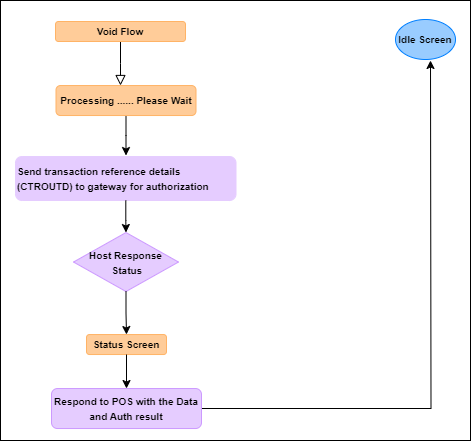
Voids
A VOID (Message Interface) transaction removes a CAPTURE or CREDIT transaction from the open batch. A void should be performed before the batch is settled or closed.
- Send Start Session Session command to start a new session. The command is mandatory to send before starting a payment transaction. Request format and expected response are provided below.
Request
<TRANSACTION>
<FUNCTION_TYPE>SESSION</FUNCTION_TYPE>
<COMMAND>START</COMMAND>
<BUSINESSDATE>20210712</BUSINESSDATE>
<TRAINING_MODE>0</TRAINING_MODE>
<INVOICE>123456</INVOICE>
<NOTIFY_SCA_EVENTS>FALSE</NOTIFY_SCA_EVENTS>
</TRANSACTION>
Response
<RESPONSE>
<RESPONSE_TEXT>Session Started</RESPONSE_TEXT>
<RESULT>OK</RESULT>
<RESULT_CODE>-1</RESULT_CODE>
<TERMINATION_STATUS>SUCCESS</TERMINATION_STATUS>
<TRAINING_MODE>OFF</TRAINING_MODE>
<COUNTER>12</COUNTER>
</RESPONSE>
- Send the below VOID (Message Interface) request for the Void transaction. Response format provided below.
Request
<TRANSACTION>
<FUNCTION_TYPE>PAYMENT</FUNCTION_TYPE>
<COMMAND>VOID</COMMAND>
<CTROUTD>75867</CTROUTD>
<PAYMENT_TYPE>CREDIT</PAYMENT_TYPE>
</TRANSACTION>
Response
<RESPONSE>
<ACCT_NUM>222360******0203</ACCT_NUM>
<APPROVED_AMOUNT>5.00</APPROVED_AMOUNT>
<AUTH_CODE>464145</AUTH_CODE>
<BANK_USERDATA>MC</BANK_USERDATA>
<BATCH_TRACE_ID>ad812dd5-9dd7-42a3-a339-8df675322864</BATCH_TRACE_ID>
<CTROUTD>75867</CTROUTD>
<INVOICE>123456</INVOICE>
<INTRN_SEQ_NUM>4016133673</INTRN_SEQ_NUM>
<MERCHID>005059233998</MERCHID>
<PAYMENT_MEDIA>MC</PAYMENT_MEDIA>
<PAYMENT_TYPE>CREDIT</PAYMENT_TYPE>
<REFERENCE>000000000005</REFERENCE>
<RESULT>VOIDED</RESULT>
<RESULT_CODE>7</RESULT_CODE>
<RESPONSE_TEXT>APPROVAL - 000 </RESPONSE_TEXT>
<TERMID>1126076</TERMID>
<TERMINATION_STATUS>SUCCESS</TERMINATION_STATUS>
<TRANS_AMOUNT>5.00</TRANS_AMOUNT>
<TRANS_SEQ_NUM>8</TRANS_SEQ_NUM>
<TRANS_DATE>2022.07.17</TRANS_DATE>
<TRANS_TIME>07:06:56</TRANS_TIME>
<TROUTD>4016133651</TROUTD>
<TRACE_CODE>133673</TRACE_CODE>
<VSP_CODE>910</VSP_CODE>
<VSP_RESULTDESC>VSP NOT APPLICABLE</VSP_RESULTDESC>
<VSP_TRXID>0</VSP_TRXID>
<COUNTER>15</COUNTER>
<RECEIPT_DATA>
        <RECEIPT>
                <TEXTLINE>     BED BATH BEYOND 1997          </TEXTLINE>
                <TEXTLINE>             1997                  </TEXTLINE>
                <TEXTLINE>       650 Liberty Ave             </TEXTLINE>
                <TEXTLINE>       UNION, NJ 07083             </TEXTLINE>
                <TEXTLINE />
                <TEXTLINE />
                <TEXTLINE>07/17/22                   16:36:58</TEXTLINE>
                <TEXTLINE />
                <TEXTLINE>Client ID: 17345800010001          </TEXTLINE>
                <TEXTLINE>Merchant ID: ********3998          </TEXTLINE>
                <TEXTLINE>Term ID: 1126076                   </TEXTLINE>
                <TEXTLINE />
                <TEXTLINE />
                <TEXTLINE>*****************VOID****************</TEXTLINE>
                <TEXTLINE />
                <TEXTLINE />
                <TEXTLINE>Appr Code: 464145                   </TEXTLINE>
                <TEXTLINE>Payment Type: CREDIT                </TEXTLINE>
                <TEXTLINE>Result:VOIDED                       </TEXTLINE>
                <TEXTLINE>Invoice: 123456                     </TEXTLINE>
                <TEXTLINE>Response: APPROVAL - 000            </TEXTLINE>
                <TEXTLINE>Approved: Online                    </TEXTLINE>
                <TEXTLINE />
                <TEXTLINE>Total:          USD   $         5.00</TEXTLINE>
                <TEXTLINE />
                <TEXTLINE />
                <TEXTLINE>     NO SIGNATURE REQUIRED          </TEXTLINE>
                <TEXTLINE />
                <TEXTLINE />
                <TEXTLINE>         Merchant Copy              </TEXTLINE>
                <TEXTLINE />
                <TEXTLINE />
                <TEXTLINE />
                <TEXTLINE />
        </RECEIPT>
</RECEIPT_DATA>
</RESPONSE>
- Once the transaction completed, send Finish Session command to finish the payment process (payment and line item transactions) and closes the session. Request format and expected response are provided below.
Request
<TRANSACTION>
<FUNCTION_TYPE>SESSION</FUNCTION_TYPE>
<COMMAND>FINISH</COMMAND>
<COUNTER>1</COUNTER>
<MAC> … </MAC>
<MAC_LABEL>REG2</MAC_LABEL>
</TRANSACTION>
Response
<RESPONSE>
<RESPONSE_TEXT>SESSION finished</RESPONSE_TEXT>
<RESULT>OK</RESULT>
<RESULT_CODE>-1</RESULT_CODE>
<TERMINATION_STATUS>SUCCESS</TERMINATION_STATUS>
<COUNTER>1</COUNTER>
</RESPONSE>
Duplicate Detection
PWC Level Detection
Duplicate checking should be enabled on the Verifone Payment Gateway portal (Point Classic) to catch duplicates in case another card is used between swipes on the device. Duplicate Transaction-based Auto-decline Support (duplicate checking) is available for merchants processing any type of payment transaction. Enabling the duplicate checking feature allows the Point platform to automatically decline transaction requests if similar requests already appear in the open batch. Activating this feature is helpful when a single transaction request may be accidentally submitted multiple times.
If duplicate checking is enabled (through the Corporate Portal or Store Portal), the Point platform will automatically decline a duplicated transaction request based on the merchant setup filters; for example, a merchant may choose to decline same Credit Card transaction based on the same amount (original transaction amount) and account number, or based on the same amount, account number and invoice within the same batch of transactions. Similar rule applies for Debit, Gift, EBT, and Check transactions.
Temporarily Disabling Duplicate Checking
The feature also includes a “manual override” option. If duplicate checking is activated, but a merchant desires to authorize multiple transactions that are identical, a flag may be sent with each payment transaction to temporarily suspend duplicate checking. To disable duplicate transaction checking for an individual transaction, send FORCE_FLAG and the value of TRUE with the transaction.
Device Level Detection
Duplicate checking can be enabled on the device level to identify a duplicate transaction based on transaction amount, last 4 digits of the card etc.
Duplicate checking should be performed based on the following parameters:
- DUPLICATECHECK parameter (Application Parameters) should be set as 1 to check the duplicate details in the entire batch or as 2 to check the duplicate details for the last transaction only. This parameter can be set to 0 to avoid the duplicate checking.
- To exclude the transaction amount comparison for duplicate detection, SKIPAMOUNTFORDUPCHECK parameter (Application Parameters) should be set to 1.
Temporarily Disabling or Overriding Duplicate Checking
If duplicate checking is enabled, but the merchant desires to do a transaction by overriding a possible duplicate detection, FORCE_FLAG flag should be sent with that payment transaction to temporarily suspend duplicate checking with a value of TRUE with the transaction.
Another way to override the duplicate checking is ALLOW_DUP_TRAN field. This field is required to send if the previous Capture transaction in the same session was declined as “DUPLICATE TRANSACTION”. The user needs to add ALLOW_DUP_TRAN tag (with value same as the INVOICE of current transaction) with the current Capture command in order to override the duplicate detection and process the transaction with the card details from previous transaction.
Store and Forward
When the Store and Forward configuration parameter (SAFEnabled in Store and Forward Parameters) is enabled and there is loss of connectivity to the server, the payment acceptance device can locally approve transactions below a set floor limit until such time as a total limit and max pending limit are reached. The stored transactions are written to a queue within the payment device and once the application can connect, transactions in the SAF queue will be sent to the gateway for processing. If the application cannot connect to the processing gateway, and the transaction is below the SAF floor limit, then it should be locally approved and stored in the SAF queue. Once connectivity is restored and the app is aware of this fact, then the SAF transactions will be de-queued. Two ways to determine whether a transaction has been sent to the host:
- Check at the gateway if the transaction is already posted, comparing the invoice, account number, and amount.
- Run SAF QUERY, taking note of the SAF_NUM of the record.
If the transaction amount is greater than or equal to the transaction floor limit (SAFLIMIT), then the application will send the following verbiage in the RESPONSE_TEXT element: Transaction amount exceeded; call for approval (or for Vantiv Direct: Authorizer is Not Currently Available) and the RESULT_CODE will be 59024. Once the approval code is acquired, the POS would send another CAPTURE command including the AUTH_CODE element with the approval code just acquired. This will add the transaction to the SAF queue.
If the response is timing out, then you will NOT enter a SAF situation. SAF is only triggered when the Point application cannot reach the host to send the transaction. If it does reach it and send the transaction, but does not receive a response, then this is a situation where you would attempt to run a LAST_TRAN to see if you can get the response. If you still do not receive a response, and determine that the internet connection is down, then this is a transaction that you would have to research once connectivity is restored by processing a TRANSEARCH report (Classic implementations) to determine whether the transaction was indeed approved. If so, and the customer made some other sort of payment, you will have the CTROUTD value in the response to process either a VOID or CREDIT for the transaction. You would process the CREDIT if the original transaction has settled. If not, you can process the VOID.
The DUPCHECK report would probably not be used in these sorts of cases. It would be more likely to be used if you received a duplicate response message and you wanted to find out if the transaction was previously approved or is a different transaction altogether.
Supported Transactions - SAF
- CAPTURE (Credit card) - NOTE: SAF applies to COMPLETION, POST_AUTH, SALE, and CLOSE_TAB transactions for Point SCA 4.0 Classic implementations. SAF applies to POST_AUTH and SALE for Vantiv Direct implementations.
- CLOSE_TAB (Credit card) – not applicable to Vantiv Direct 4.0 or Engage
- VOID (based on configuration) – not applicable to Vantiv Direct 4.0 or Engage
- ACTIVATE (Gift, based on configuration – not applicable to Vantiv Direct 4.0 or Engage)
- AUTH (Credit card – not applicable to Vantiv Direct or Engage) - NOTE: SAF applies to both AUTH (Pre-authorization) and AUTH with AUTH_CODE (Voice authorization). Once an AUTH transaction is in SAF, a SAF EDIT transaction must be run to change status from PREAUTH to ELIGIBLE.
- CREDIT (Credit card, based on configuration – not applicable to Vantiv Direct 4.0)
Tokens
Card Tokens
Card based tokens provide the ability to process using tokens as set up within the merchant’s store hierarchy.
PAYMENT transaction responses may conditionally contain a two-way token in the RESPONSE element (in a non-token transaction). PAYMENT transaction requests may conditionally contain a token in the REQUEST element (when token is known).
| Field | Value/Example | Description |
|---|---|---|
| CARD_TOKEN | Example: 7987654321098765 |
|
Refunds
If you receive CARD_TOKEN and accompanying fields (e.g., BANK_USERDATA) in the response, then refunds and follow-on transactions must be card token based.
Transaction Tokens
The transaction-based token – CTROUTD and TROUTD – are to be used within the same gateway Client ID.
Example 1: A customer purchases an item and then two weeks later, the customer wants to purchase another item in the same store. You could populate with the TROUTD (or CTROUTD) value from the original transaction and the new transaction would not prompt for card data – it would use what was “on file” at the gateway.
Example 2: If a customer returns the same day to the same store to return a purchase, you would use the CTROUTD of the original transaction to process a VOID. If this was a different store/different Client ID, you could not do either of the previous examples. You would have to process new transactions that gather the new card data.
In production, TROUTD and CTROUTD values have a ‘shelf life’ of 10 months. A new TROUTD is received with each transaction.
Receipt Printing
The SCA receipt is generated in the format provided in html files.
Verifone will provide the full EMV receipt XML plus individual tags for those integrators looking to craft their own receipts. Refer to Receipt Data in Response section for more details.
SCA Generated Receipt Line Text
- Maintains automatic compliance with EMV and regulatory requirements
- Plain looking receipts
- One receipt per authorization
Parsed Response and Custom Generated Receipt
- Full control of the receipts
- Better ‘Look and Feel’
- Ability to aggregate split tenders
- Requires integrator to parse and print EMV compliant tags
Last Transaction
General best practice is to send the LAST_TRAN report command if a timeout is received or if a transaction response is not received at all. It is recommended practice – but not limited practice - for the POS to use this command for any case where the disposition of an attempted payment transaction is unknown (e.g., communication loss between the POS and SCA device while a transaction is in flight). The Last Transaction report is used to determine the status of the most recent transaction processed from that particular device/workstation. There is no need to habitually run the LAST_TRAN report.
A very important element of LAST_TRAN is STATUS_CODE. This will tell you if the transaction was approved, as the codes for this element are the same as those for the RESULT_CODE. If you receive a STATUS_CODE of 6, then you know that the transaction was DECLINED. If STATUS_CODE is 4 or 5, you know it was approved. You can then look at the AUTH_CODE, if a CAPTURE or AUTH, and CTROUTD, etc. to get the rest of the details.
Important Considerations and Ramifications of Not Doing Last Transaction Report
Ramifications of not doing LAST_TRAN will manifest in duplicate charges to the card holder.
LAST_TRAN is designed to give the POS the option to review the state of the last transaction performed. There are times in which the transactional approval or decline doesn’t make it back to the POS, either due to network error conditions or potential situations in which the POS times out on the AUTH/CAPTURE request.
When the POS is in a position where the status of the last transaction is undetermined, then the first step is to use the last transaction report and determine if the invoice and transaction amount matches the prior AUTH/CAPTURE request. If yes, the status is now known and a second request of the same transaction is not necessary, unless declined.
If the LAST_TRAN cannot match the invoice and amount of the prior request, there is potential that the transaction has gone into SAF and SAF QUERY should be run to determine if the invoice and amount match a transaction in the SAF queue.
Refer to Last Transaction command for more details.
Time Out Reversals (TOR) Functionality
Time Out Reversals (TOR) requests will be posted by the application for ADS (PRIV_LBL) PRE_AUTH, REFUND and Canadian Debit.
TOR is applicable for ADS (PRIV_LBL) and for Canadian Debit (Interac) cards in UGP solution. When there is a timeout between the gateway and processor, TOR is handled by the gateway itself. If there is a timeout between the terminal and the gateway, then the terminal performs auto last transaction to determine whether the transaction was approved or declined. However, in case of UGP, the application validates the invoice, account number, command, payment type, and transaction amount fields present in the auto-last-transaction response packet. In UGP, configuration parameter TORRETRYCOUNT is required to set the number of times TOR requests will be posted by the application for ADS (PRIV_LBL) PRE_AUTH, REFUND and Canadian Debit.
In TOR functionality with FDRC, the TOR occurs for all payment transactions and for all cards when the terminal experience a response timeout. The TOR performed in the FDRC is essentially a voided transaction of the previously performed transaction (last transaction). In FDRC, configuration parameter TORRETRIES_1 is required to set the number of times TOR requests will be posted by the application.
The following are TOR response codes that could be received by SCA and applicable for GSC only.
| Error Codes | Error Description |
|---|---|
| 504 | HTTP Error codes from Green Box |
| 9111 | Card issuer timed out |
| 9999 | General Error - Unknown or Unspecified reason |
| 9125 | Database error |
| 9109 | System malfunction |
| 9201 | Transaction refused after sending to acquirer |
Handling POS Disconnection and Timeout
When POS gets timed out or disconnected due to network or communication failures during any ongoing payment transaction and once the connection is reestablished, the best practices are:
-
To send the secondary port Status command to know the current status of the terminal. Refer to Secondary Data Values table in Status command response for more details on the various possible values.
-
If payment is attempted, then send LAST_TRAN command to understand the status of the last transaction and compare it to the current ongoing transaction to perform the necessary action as:
- If the LAST_TRAN comparison indicates that the attempted transaction is not a match, then the POS could re-perform the transaction.
- If the LAST_TRAN comparison indicates a match, then the POS could print a receipt and Finish the session.
-
In case, the Secondary Port STATUS command returns 13 (IN SESSION PAYMENT), then POS should decide, whether to send Secondary Port CANCEL command and followed by FINISH Session. However, application would not allow CANCEL command in certain scenarios like, if the transaction is processing to Host.
-
Hence, based on the overall Secondary Port STATUS, POS should perform the next necessary action, whether to wait to process the transaction or VOID/CANCEL the transaction and followed by FINISH Session command.
